

* З 1 червня 2023 р. закриті ключі для всіх нових та повторно випущених сертифікатів підпису коду повинні зберігатися на апаратних токенах або апаратних модулях безпеки HSM, сертифікованих як FIPS 140 рівня 2, Common Criteria EAL 4+ , або еквівалент.
-----------------------------------
* Доставка токена в Україну на даний момент ускладнена у зв'язку з військовою агресією росії проти України. У зв'язку з цим Ви можете використовувати власний апаратний токен
SafeNet eToken 5110 CC - for RSA and ECC certificates
SafeNet eToken 5110 FIPS - for ECC certificates only
Code Signing сертификаты для подписи програмного кода и приложений
| Сертифікат (2 шт.) | Купити |
| id370ev DigiCert-VIP Code Signing EV
Level: DigiCert-VIP CODE EV MULTI |
|
| id470ov DigiCert Code Signing OV
Level: DigiCert CODE OV MULTI |
Як тільки не називають сертифікати цього класу :)
підпис коду, підпис програми, підпис програмного забезпечення, посвідчення видавця, підтвердження цілісності коду, підтвердження цілісності програми, підтвердження цілісності програмного забезпечення, сертифікат програми, підпис додатків, сертифікат для програми, сертифікат розробника, захист програми, підпис коду. В англійському варіанті найбільш популярні два визначення - code sign и code signing certificate.
DigiCert KeyLocker
- це автоматизована альтернатива ручному створенню та зберіганню вашого закритого ключа на апаратному токені, який можна втратити чи вкрадено, або придбанню апаратного модуля безпеки HSM і зберіганню його на місці. Хмарне сховище надає додаткову перевагу, оскільки дозволяє отримати доступ до свого закритого ключа в будь-який час і підписати код з будь-якого місця.
DigiCert KeyLocker забезпечує:
- Галузеве сховище ключів HSM.
- Інтеграція з конвеєрами CI/CD.
- Рішення для підпису за допомогою DigiCert і сторонніх інструментів підпису.
- Для підпису за допомогою ключа використовується багатофакторна аутентифікація.
Перед тим як замовити Code Signing слід ознайомитися із загальною інформацією про цей вид сертифіката:
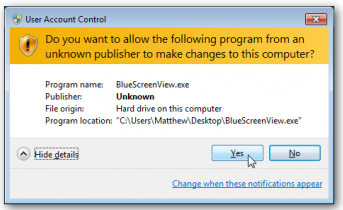
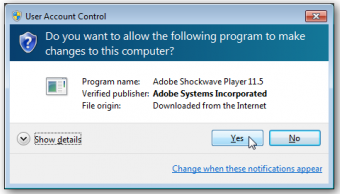
Code Signing сертифікат або сертифікат розробника - це ключ, яким підписується програмне забезпечення або скрипти, що підтверджує автора програми та гарантує, що код не було змінено після того, як цифровий підпис було накладено. Під час інсталяції програмного забезпечення або драйвера без цифрового підпису ви отримаєте попередження від Windows.
Мітка часу Timestamp використовується для вказівки часу, коли було зроблено цифровий підпис. Якщо Timestamp присутня, то програма, яка перевіряє підпис, перевірить чи був сертифікат, пов'язаний з підписом, дійсним на момент підпису. Якщо ж такої мітки немає, і термін сертифіката вже закінчився, то підпис буде вважатися недійсним. Тобто ця мітка часу дозволяє використовувати підписаний код, навіть після закінчення терміну дії сертифіката.
- Microsoft Authenticode - для підпису 32 та 64 бітних файлів (.exe, .cab, .dll, .ocx, .msi, .xpi та .xap файли). Дозволяє підписувати Microsoft® Office, Microsoft VBA, Netscape Object Signing та Marimba Channel Signing. Підтримує програми на Silverlight 4.
- Java Code Signing - для підпису Java аплетів, .jar файлів, Java додатків для настільних та мобільних пристроїв.
- Code Signing for Apple - для підпису програм та оновлень для Mac OS.
- Microsoft Office Vba Signing - підписує VBA об'єкти, скрипти та макроси Microsoft Office .doc, .xls, и.ppt.
- Adobe Air Signing - для підпису файлів .air та всіх програм, заснованих на AIR
- Android - для підпису та оптимізації .apk файлів для платформи Android
- Microsoft Windows Phone - для цифрового підпису додатківWindows Phone, Xbox 360 и сервиса Microsoft App Hub
- BREW - для розробників додатків під платформу BREW
EV CodeSign сертифікат підтверджує:
Безпечно. Надійність інформації гарантує CA. Справжність організації (власника підпису) підтверджена CA та третьою стороною. Записи загальнодоступного аудиту доступні.
Приватний ключ зберігається на захищеному носії.
- Організація існує
- У сертифікаті міститься інформація про організацію
- Адміністратор сертифікату має право отримати серт для організації
- Адміністратор сертифіката приймає зобов'язання щодо використання сертифіката
- Записи загальнодоступного аудиту доступні
- Приватний ключ зберігається у адміністратора сертифіката
CodeSign сертифікат підтверджуе:
Безпечно. Надійність інформації гарантує CA. Справжність організації (власника підпису) підтверджена CA та третьою стороною. Записи загальнодоступного аудиту недоступні.
- Організація існує
- У сертифікаті міститься інформація про організацію/фізособу
- Адміністратор сертифікату має право отримати серт (для організації)
- Записи загальнодоступного аудиту недоступні